
Ever wonder where a box has been, who touched it last, or what changes were made along the way? The Box History feature in Gimmal Physical provides a full audit trail of every action taken on a specific box — from transfers and check-ins to updates and checkouts. Whether you’re troubleshooting a location discrepancy or simply want better visibility into your records, Box History gives you the transparency you need to maintain confidence in your physical records program.
With just a few clicks, you can trace the full lifecycle of a box and ensure your processes are being followed correctly.
How to View and Understand Box History in Gimmal Physical
Transfers between users or storage locations
-
Check ins/Checkouts for review or use
-
Detail updates like changes to box metadata
🔍 How to Use It:
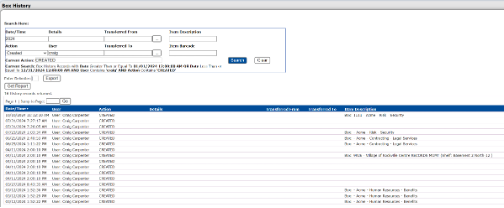
1. Navigate to the Box History tab from the main navigation.
2. Use filters such as:
-
Action (e.g., Transfer In, Transfer Out, Checked In)
-
User (e.g., Transferred From/To)
-
Date Range or Box/Item Barcode
3. Click Search to generate a timeline of activity.
📘 Pro Tip:
Each action is time stamped and associated with a user, making it easy to audit movement and updates across the record’s lifecycle.
Don’t hesitate to contact support if you have any questions.
First published March, 2025